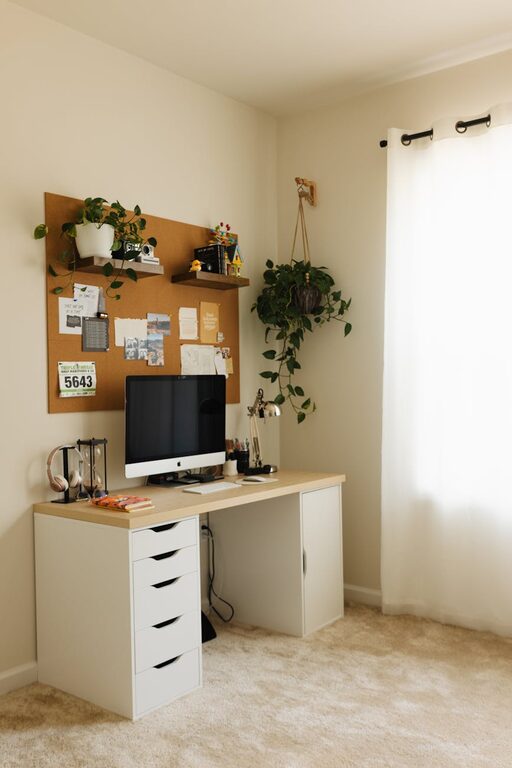
Creating a home office that feels cozy yet supports your productivity can make a big difference in your daily work routine. Whether you work remotely full-time or just need a dedicated space for occasional tasks, a well-designed workspace can boost your focus, comfort, and efficiency. Here are some helpful tips to design a home office space that balances warmth and practicality.
Choose the Right Location
Finding the ideal spot for your home office is the first step. Ideally, pick a quiet area with minimal distractions. A spare room is perfect if you have one, but a corner in your living room or bedroom can work too.
– Select a space with natural light to improve mood and reduce eye strain.
– Avoid high-traffic areas where noise and interruptions are common.
– Consider your daily routine when choosing the spot, making sure it’s easy to access but separate from leisure spaces.
Invest in Ergonomic Furniture
Comfort is key in preventing fatigue and maintaining productivity. An ergonomic desk and chair support good posture, reducing the risk of discomfort or injury.
– Choose an adjustable chair with lumbar support.
– Ensure your desk is at a comfortable height for typing and writing.
– If possible, use a sit-stand desk to vary your working position throughout the day.
– Position your monitor at eye level to avoid neck strain.
Develop an Efficient Layout
Organizing your workspace thoughtfully helps you stay focused and reduces clutter.
– Place frequently used items within arm’s reach.
– Use shelves, cabinets, or drawers to keep documents and supplies tidy.
– Leave enough desk space for your computer, notebook, and any reference materials.
– Consider cable management solutions to keep wires neat and out of the way.
Create a Cozy Atmosphere
Small touches can transform your home office into a welcoming space where you enjoy spending time.
– Add soft textures with rugs, cushions, or a cozy blanket.
– Incorporate plants to improve air quality and add natural beauty.
– Use warm lighting options like desk lamps or string lights instead of harsh overhead lighting.
– Personalize your space with artwork, photos, or inspirational quotes, but avoid overcrowding.
Maintain Good Lighting
Proper lighting is essential not only for comfort but also for your eye health.
– Maximize daylight by positioning your desk near a window.
– Use adjustable task lighting to avoid glare on screens.
– Consider full-spectrum bulbs that mimic natural light if your office lacks sunlight.
– Reduce screen brightness and take regular breaks to rest your eyes.
Establish Boundaries
Separating work from home life can be challenging when your office is inside your living space.
– Set specific working hours and stick to them.
– Use physical signals like closing a door or a “do not disturb” sign to indicate work time.
– Avoid mixing leisure activities in your workspace to help maintain focus.
Organize Regularly
A cluttered desk can lead to a cluttered mind. Developing simple routines to keep your office tidy will support ongoing productivity.
– Set aside time at the end of each day to clear your desk.
– Use organizers for stationery, files, and cables.
– Digitize paperwork when possible to reduce physical clutter.
– Reassess your workspace every few weeks and adjust as needed.
Consider Technology and Connectivity
Reliable technology helps you work with fewer interruptions.
– Invest in a strong internet connection to support video calls and downloads.
– Use wireless devices to reduce cable clutter.
– Keep your devices charged and backed up.
– Use noise-cancelling headphones if you work in a noisy environment.
—
By combining comfort with organization and paying attention to your work habits, you can create a cozy and highly productive home office. The key is to design a space tailored to your personal needs that makes work feel more enjoyable and less stressful. Whether you’re writing reports, attending virtual meetings, or brainstorming ideas, a thoughtful home office sets you up for success every day.